UX CASE STUDY · GOVTECH · Apr - May 2025
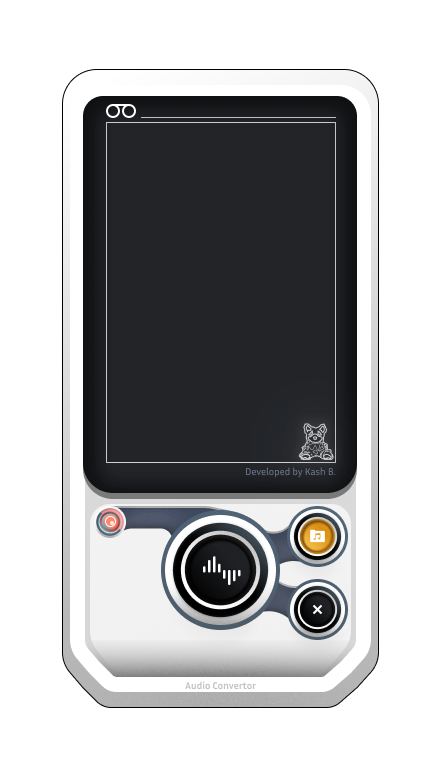
Court audio conversion cut from 60 minutes to under 15 with one app that runs on any machine.
Court recordings were locked in a proprietary format that only two Windows apps could open, and staff spent over an hour on every conversion request. I built a single Flutter app powered by FFmpeg that decrypts, merges, and converts the audio in under 15 minutes, so clients leave with their files the same day.
I designed and built the whole thing at the Supreme Court of BC's In-Court Technology team. The FFmpeg knowledge came from my earlier AI transcription work, so when this problem surfaced I already knew the tool that could crack it.
The Problem vs. The Solution
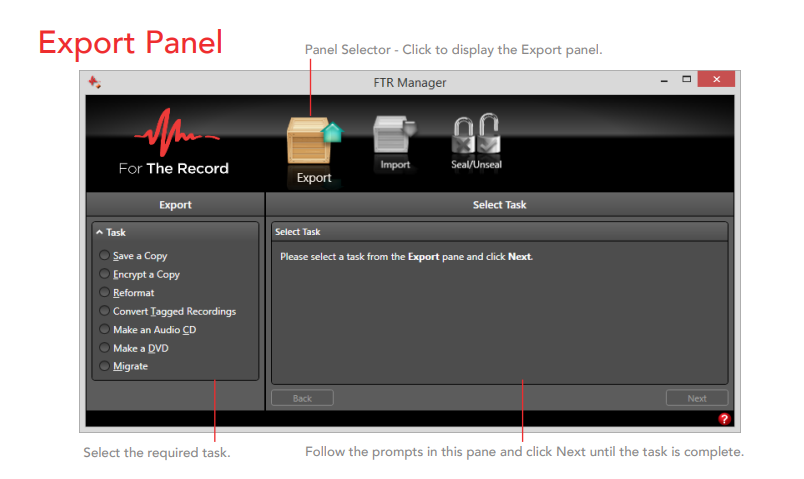
The proprietary format was a dead end for anyone not on Windows, and that included Justices working from Mac laptops in chambers. Every request meant juggling For The Record's two licensed apps, over an hour of active staff time, and a return trip for the client.
The double-app bottleneck
Court staff juggled two Windows-only proprietary tools to extract audio from every proceeding, and clients still had to come back to collect.
One app, one click
A Python backend using FFmpeg handles decryption, concatenation, and conversion in one pass. A Flutter frontend gives staff a clean single-dashboard experience on any OS.
The Impact
Measured against the legacy 2-app workflow every conversion request used to go through.
Conversion time per request
Key Design Decisions
Three calls that shaped the build, each forced by a real constraint rather than a preference.
Instead of automating FTR Player and FTR Manager, the tool goes straight to FFmpeg to decrypt and convert the .trm chunks.
Wrapping the FTR apps would have kept every constraint that made them painful: Windows-only, licensed, and manual. FFmpeg work from the AI transcription project showed the format could be handled directly, so both apps could be cut out.
The Python backend was built and proven against real court audio files before any frontend work started.
The whole project hinged on whether FFmpeg could actually decrypt the proprietary format. Proving that first meant no interface got designed around a pipeline that might not work.
One screen, one folder picker, one Convert button, tested with clerks who had only ever used the proprietary tools.
Staff are court clerks, not software people, and the old tools locked out every non-Windows machine. Flutter gave one codebase across Mac and Windows, and the 60-second usability bar kept the design honest.
One Conversion, Both Ways
The legacy path through For The Record's two-app suite, against the converter. Clips were worse: two playheads set in the Player first, then back to the Manager to convert.
- 01Open FTR Player and hunt down the hearing audio
- 02Load the recording in the Player
- 03Open FTR Manager alongside it
- 04Configure the job: time frame and output format
- 05For clips, set two playheads back in the Player
- 06Convert and wait
- 07Verify the output actually plays
- 01Load the day's audio folder
- 02Pick the .trm files you need, or take the whole day
- 03Hit Go: decrypt, merge, and convert in one pass
- Open FTR Player and hunt down the hearing audio
- Load the recording in the Player
- Open FTR Manager alongside it
- Configure the job: time frame and output format
- For clips, set two playheads back in the Player
- Convert and wait
- Verify the output actually plays
- Load the day's audio folder
- Pick the .trm files you need, or take the whole day
- Hit Go: decrypt, merge, and convert in one pass
The Full Flow, Side by Side
The workflow above is the short version. This is the complete before and after, every step and every place the old chain made you stop and switch tools.
Before and after user flow. The vendor tool chain against the single-button converter, mapped step for step.
From Wireframe to Shipped Converter
Wireframes collapsed the two-app flow into one screen, the backend was proven against real court audio, then the Flutter build went through nine development phases.
The Vendor Suite vs One Button
Drag the handle. For The Record's export workflow against the converter's single dashboard.
The Legacy Suite
What every conversion request had to route through before.
Side knowledge cracked the main problem
I didn't set out to learn FFmpeg for this project. It came from building AI audio pipelines on the transcription tool, and it turned out to be the exact key to a format everyone assumed needed the vendor's software. That's the first lesson: deep familiarity with your tools pays off in places you never planned for. Staff feedback taught the second one. Going from a two-app, one-hour headache to a single click mattered more to them than anything clever underneath. The honest risk I carry forward is that the format belongs to the vendor, not to me. If they change the encryption, this tool starts over from zero, which is exactly why the backend was proven against real court audio before a single screen existed. When you build against a closed format, you prove the fragile part first and keep everything else cheap to rebuild.
Let's build something impactful.
I'm currently open to new opportunities in UX/UI Design, Product Design, and GovTech transformation roles.