UX CASE STUDY · GOVTECH · July 20 - 30, 2025
Public access to court hearings unlocked in 10 days with a solo-built Flutter dialer.
A custom Flutter dialer built solo in a ten-day July sprint. It generates the DTMF tones that bridge courtroom video hardware to the MS Teams public call-in service, and it has run with 100% reliability since deployment.
I solo-developed this project end-to-end: from researching audio frequency generation in Flutter and Dart, to building the functional engine, to designing multiple high-fidelity UI skins in Figma.
The Problem vs. The Solution
The Supreme Court had the video hardware and the MS Teams service. What it didn't have was a way to connect them, so public access meant gallery seats, a TV wheeled into the hallway, and email lists serviced by hand every hearing morning.
The DTMF block
Courtroom video hardware could not generate the specific DTMF tones required to initiate and host the MS Teams bridge call, so the public-access system sat unusable.
The Flutter dialer
A custom Flutter app that generates the precise DTMF tones, connecting the courtroom video cart to the Teams service and opening hearings to the public.
The Impact
A ten-day solo sprint that unlocked an entirely new channel for public participation in Supreme Court proceedings.
Public bridge connections
Key Design Decisions
Every trade-off was deliberate. These three calls shaped the final product, each made against a real constraint.
Went from a functional requirement to a live build in days. No committee reviews, no multi-sprint roadmap.
Public hearings were blocked without this tool, so speed was non-negotiable. The MVP focused on one thing: generating tones reliably.
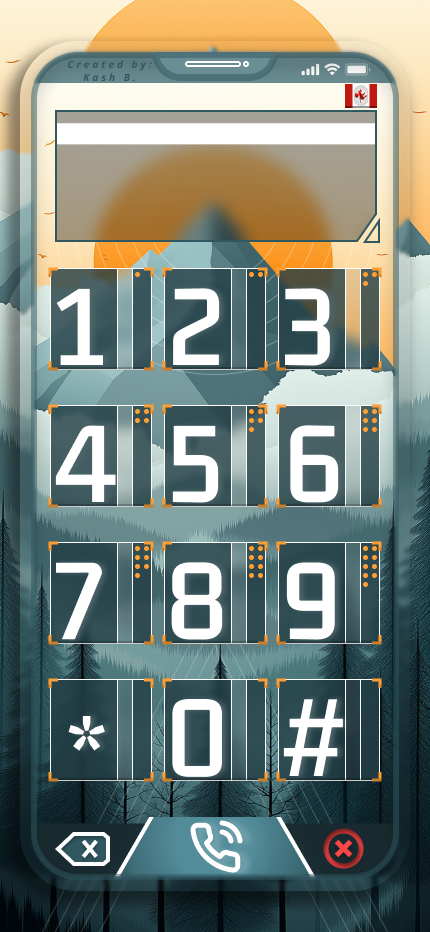
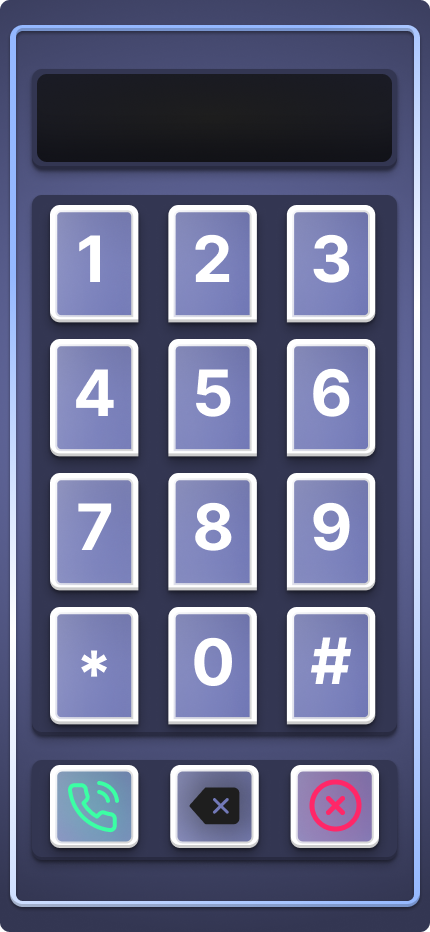
Designed four skins in Figma: the original purple, two planned as user-switchable options, and the BC Mountain theme that shipped.
The core logic was locked early, which freed the second week for design. Switchable skins made a utility feel like a finished product that belonged in a courtroom.
All public callers connect through one controlled Teams participant, never as individual attendees.
Open attendee access risks hot mics disrupting proceedings. Routing everyone through one participant keeps judicial control over who is heard in the courtroom at all times.
Getting Into a Hearing, Both Ways
What it took a member of the public to attend remotely, before and after. The clerk's side is three steps too: open the dialer, share screen to the courtroom's video cart, dial the bridge into the room.
- 01Sit in the gallery, or catch a TV set up outside the courtroom
- 02For virtual access, contact a separate registry counter
- 03Prove you're connected to the court file
- 04Get your email added to the file's access list
- 05Wait for staff to hand-send the Teams link the morning of
- 01Dial the courtroom's public bridge number
- 02Hear the automated rules message
- 03You're in: auto-muted, listening live
- Sit in the gallery, or catch a TV set up outside the courtroom
- For virtual access, contact a separate registry counter
- Prove you're connected to the court file
- Get your email added to the file's access list
- Wait for staff to hand-send the Teams link the morning of
- Dial the courtroom's public bridge number
- Hear the automated rules message
- You're in: auto-muted, listening live
Two Ways Into the Room
The dialer served two audiences with nothing in common. A member of the public calling in from anywhere, and the courtroom cart on the other end. Both flows are live below.
Public caller. The path into a hearing from the published call-in number, with no account and no app to install.
Judge bridge. The courtroom side, where the video cart has to produce the dial tones the service expects before it can connect at all.
Ten days, first skin to shipped
Drag the handle. The original purple skin against the BC Mountain theme that shipped to the courtroom floor.
The Other Skins
Four skins came out of the design week: the original purple, the BC Mountain theme that shipped, and two designed as options users could switch between.
Design Process
A rapid ten-day sprint: development and research first, then design and a live courtroom test with the people who had to sign off on it.
- ▸Courtroom hardware audit
- ▸MS Teams bridge requirements
- ▸DTMF tone specification research
- ▸Audio frequency generation in Dart
- ▸Core DTMF functional engine
- ▸Rapid Flutter prototyping
- ▸Multiple UI skins designed in Figma
- ▸Utility tool raised to a courtroom aesthetic
- ▸Intuitive dial pad interaction design
- ▸Dry-run in an empty courtroom with an executive and my manager
- ▸Found the one screen-share order that carried sound reliably
- ▸The working procedure became the official instruction manual
Built fast, built to be replaced
The entire public-access system was blocked by one missing capability: the right tones at the right moment. No platform rebuild, no committee. A focused tool that does one thing has run with 100% reliability since deployment, and the four Figma skins were my proof that a two-week window doesn't have to cost craft. The part I'd actually tell a team is the least impressive-sounding one: this dialer is glue between two systems I don't control, and glue should expect to be replaced. If the court swaps its video carts or its conferencing service, the tool's job ends that week. I built it cheap and disposable on purpose. Knowing when to build disposable software is a skill nobody puts on a resume.
Let's build something impactful.
I'm currently open to new opportunities in UX/UI Design, Product Design, and GovTech transformation roles.