UX CASE STUDY · META · 2026
Every case study on this site was rebuilt in about 15 minutes each, by a tool built for the job.
A single-file wizard that turns a case study into structured data and exports a drop-in portfolio page. It replaced hand-editing an 855-line HTML template, and every study you can read on this site, including this one, came out of it.
I built this for an audience of one: me, with a portfolio to rebuild and no appetite for editing 855 lines of HTML six more times. It became the design system for the whole site.
The Problem vs. The Solution
Portfolio case studies lived as hand-edited copies of one 855-line HTML template. Every edit was a chance to break something, every study drifted from the others, and the content was trapped inside the markup.
One template, hand-edited forever
The production template was strong content design wrapped in a terrible authoring workflow.
Content becomes data, the preview is the page
A guided wizard on one side, the actual export document rendering live on the other. Fill the fields, watch the page, download the file, drop it on the site.
The Impact
Measured against the workflow this replaced: hand-editing the production template for every study on the site.
Hand-edited markup per case study
Key Design Decisions
Three calls that made it a tool instead of a demo, each anchored to a real constraint.
The live preview pane renders the exact HTML the export button downloads. Same generator function, same output, no preview-vs-production gap.
Preview drift is how authoring tools lose trust. If what you see can differ from what ships, you end up checking both forever. One code path makes drift impossible.
Studies live as plain JSON files in a git repo. No database, no backend, no accounts. The builder itself is one HTML file that works offline.
A CMS is a service you maintain; a JSON file is content you own. Git gives history and review for free, and a single-file tool can never rot behind a dependency update.
An AI Brief button copies a prompt plus the exact schema to the clipboard. Claude drafts the study as JSON on my existing plan, and Load JSON pulls it in.
A static page with an embedded API key is a security hole with a billing problem. The clipboard route costs nothing, leaks nothing, and uses the subscription I already have.
Publishing a Case Study, Both Ways
The same job, before and after the builder. The old side is also where every edit nudged the design a little further off course.
- 01Duplicate the 855-line template file
- 02Hunt down each section marker in the markup
- 03Paste the writing into the right tags
- 04Hand-swap every image path and caption
- 05Fix whatever the edits broke
- 06Eyeball the page against the other studies
- 07Spot a difference, edit again, drift further
- 01Fill the wizard or load the study's JSON
- 02Watch the live preview, which is the export
- 03Export the page and drop it on the site
- Duplicate the 855-line template file
- Hunt down each section marker in the markup
- Paste the writing into the right tags
- Hand-swap every image path and caption
- Fix whatever the edits broke
- Eyeball the page against the other studies
- Spot a difference, edit again, drift further
- Fill the wizard or load the study's JSON
- Watch the live preview, which is the export
- Export the page and drop it on the site
One night vs. one tool
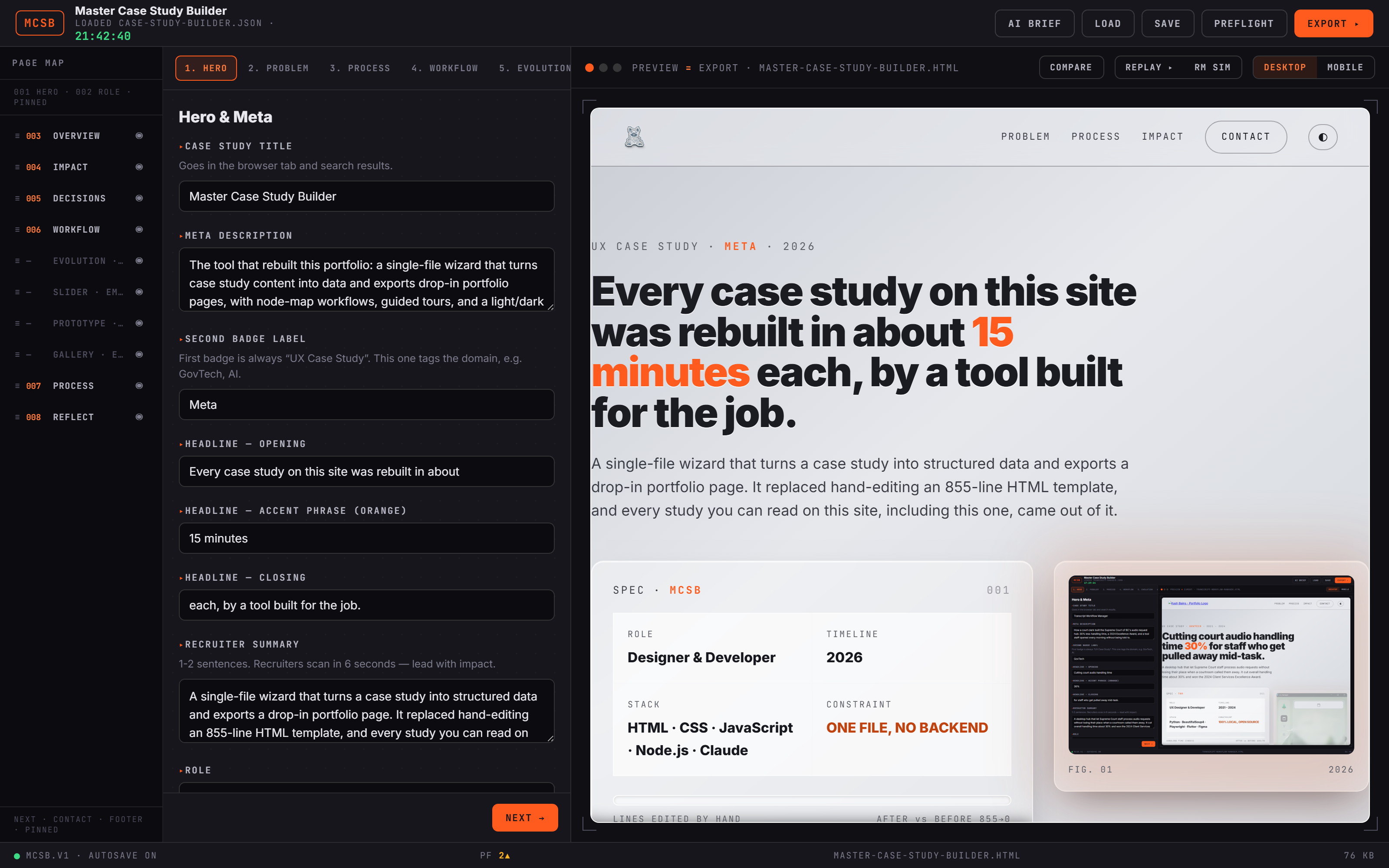
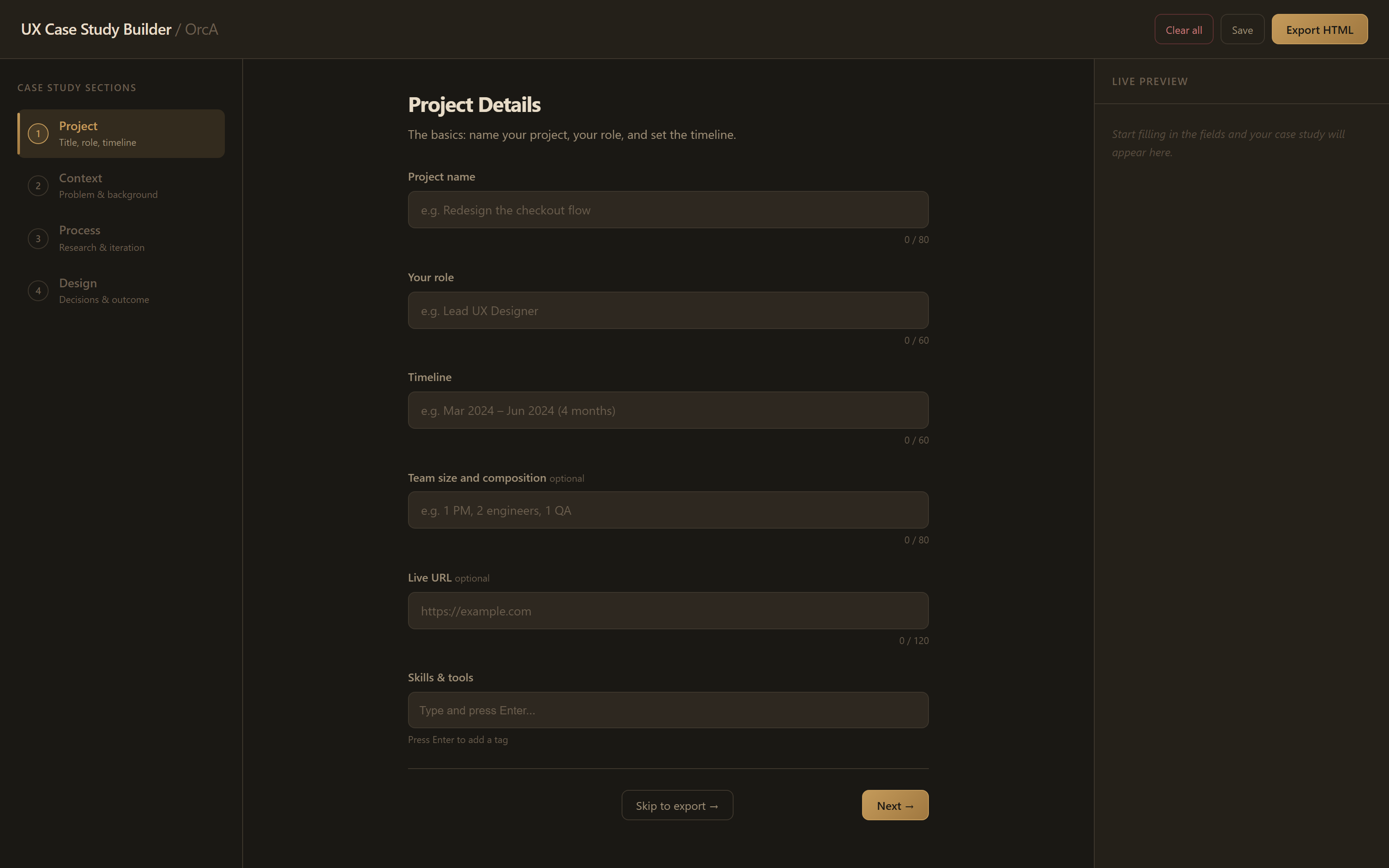
The first version was an overnight agent build: a four-step form with an empty preview pane, proof that the wizard workflow could work. Four days later it had become an instrument. Drag the handle to compare.
Use the builder yourself
The real tool, running live with this study's own JSON loaded. Walk the wizard, drag sections in the page map, open preflight, and watch the export preview react. What you are reading came out of what you are holding.
Inside the instrument
The builder chrome is a design HUD: every panel exists to answer a question about the page before it ships.
Design Process
It started as an overnight build by my own agent pipeline, went through a head-to-head against the production template, and came out the other side as the site's design system.
- ▸An overnight agent build proved the wizard workflow
- ▸Head-to-head comparison against the production template
- ▸Verdict: template won content design, wizard won authoring
- ▸PRD bar: a full case study in about 15 minutes
- ▸Export must be a drop-in page, zero hand-editing after
- ▸Work is never lost: autosave plus JSON round-trip
- ▸Glass design system drawn from my agent dashboard concepts
- ▸Type unified with the site: Inter and JetBrains Mono only
- ▸Light and dark themes from one variable set
- ▸Headless build script batch-exports every study
- ▸Six case studies and a user-flow page regenerated
- ▸Shipped as the live kashb.ca redesign
The best design system is the one that enforces itself
I spent years keeping case studies consistent by being careful. The builder made carefulness unnecessary: the design system lives in one generator function, so consistency is a property of the tool, not a habit I have to maintain. The other lesson was watching my own content become data. The moment a study was JSON instead of markup, redesigning the whole site stopped being a rewrite and became a rebuild command. This page came out of the tool it describes.
Let's build something impactful.
I'm currently open to new opportunities in UX/UI Design, Product Design, and GovTech transformation roles.